A read-later app for Android
Find a read that fits the time you have.
Scroll to see how it works
-
9:41en.wikipedia.org
Tea ceremony
Share
Tea ceremonyen.wikipedia.org
 Steep
MessagesEmailNotes
✓Saved to Steep×
Tea ceremony
UndoOpen Steep →
9:41Steep⋮Your list Quick reads
1 saved · about 12 min of reading2 saved · about 16 min of reading3 saved · about 41 min of reading4 saved · about 44 min of reading5 saved · about 52 min of reading6 saved · about 1 h 19 min of reading7 saved · about 1 h 24 min of reading8 saved · about 1 h 44 min of reading 3 saved · about 12 min of reading
Your list 012345678Your list 012345678 Quick reads 0123Quick reads 0123 Coffee break 012Coffee break 012 Long reads 0123Long reads 0123
Quick reads5 min or less
Haikuen.wikipedia.org · 4 min
Sourdoughen.wikipedia.org · 3 min
Bonsaien.wikipedia.org · 5 min
Coffee break6–15 min
Tea ceremonyen.wikipedia.org · 12 min
Fountain penen.wikipedia.org · 8 min
Long readsover 15 min
Lighthouseen.wikipedia.org · 25 min
Origamien.wikipedia.org · 27 min
Afternoon teaen.wikipedia.org · 20 min
Step 1
Found something good, but no time right now?
-
9:41en.wikipedia.org
Tea ceremony
Share
Tea ceremonyen.wikipedia.org
Steep
MessagesEmailNotes
✓Saved to Steep×
Tea ceremony
UndoOpen Steep →
9:41Steep⋮Your list Quick reads
1 saved · about 12 min of reading2 saved · about 16 min of reading3 saved · about 41 min of reading4 saved · about 44 min of reading5 saved · about 52 min of reading6 saved · about 1 h 19 min of reading7 saved · about 1 h 24 min of reading8 saved · about 1 h 44 min of reading 3 saved · about 12 min of reading
Your list 012345678Your list 012345678 Quick reads 0123Quick reads 0123 Coffee break 012Coffee break 012 Long reads 0123Long reads 0123
Quick reads5 min or less
Haikuen.wikipedia.org · 4 min
Sourdoughen.wikipedia.org · 3 min
Bonsaien.wikipedia.org · 5 min
Coffee break6–15 min
Tea ceremonyen.wikipedia.org · 12 min
Fountain penen.wikipedia.org · 8 min
Long readsover 15 min
Lighthouseen.wikipedia.org · 25 min
Origamien.wikipedia.org · 27 min
Afternoon teaen.wikipedia.org · 20 min
Step 2
Share → Steep.
Works from Chrome, your news app, or anywhere you can share a link.
-
9:41en.wikipedia.org
Tea ceremony
Share
Tea ceremonyen.wikipedia.org
Steep
MessagesEmailNotes
✓Saved to Steep×
Tea ceremony
UndoOpen Steep →
9:41Steep⋮Your list Quick reads
1 saved · about 12 min of reading2 saved · about 16 min of reading3 saved · about 41 min of reading4 saved · about 44 min of reading5 saved · about 52 min of reading6 saved · about 1 h 19 min of reading7 saved · about 1 h 24 min of reading8 saved · about 1 h 44 min of reading 3 saved · about 12 min of reading
Your list 012345678Your list 012345678 Quick reads 0123Quick reads 0123 Coffee break 012Coffee break 012 Long reads 0123Long reads 0123
Quick reads5 min or less
Haikuen.wikipedia.org · 4 min
Sourdoughen.wikipedia.org · 3 min
Bonsaien.wikipedia.org · 5 min
Coffee break6–15 min
Tea ceremonyen.wikipedia.org · 12 min
Fountain penen.wikipedia.org · 8 min
Long readsover 15 min
Lighthouseen.wikipedia.org · 25 min
Origamien.wikipedia.org · 27 min
Afternoon teaen.wikipedia.org · 20 min
Step 3
A small card confirms it.
Add a tag right there, or undo in one tap.
-
9:41en.wikipedia.org
Tea ceremony
Share
Tea ceremonyen.wikipedia.org
Steep
MessagesEmailNotes
✓Saved to Steep×
Tea ceremony
UndoOpen Steep →
9:41Steep⋮Your list Quick reads
1 saved · about 12 min of reading2 saved · about 16 min of reading3 saved · about 41 min of reading4 saved · about 44 min of reading5 saved · about 52 min of reading6 saved · about 1 h 19 min of reading7 saved · about 1 h 24 min of reading8 saved · about 1 h 44 min of reading 3 saved · about 12 min of reading
Your list 012345678Your list 012345678 Quick reads 0123Quick reads 0123 Coffee break 012Coffee break 012 Long reads 0123Long reads 0123
Quick reads5 min or less
Haikuen.wikipedia.org · 4 min
Sourdoughen.wikipedia.org · 3 min
Bonsaien.wikipedia.org · 5 min
Coffee break6–15 min
Tea ceremonyen.wikipedia.org · 12 min
Fountain penen.wikipedia.org · 8 min
Long readsover 15 min
Lighthouseen.wikipedia.org · 25 min
Origamien.wikipedia.org · 27 min
Afternoon teaen.wikipedia.org · 20 min
Step 4
Steep sorts it by length.
-
9:41en.wikipedia.org
Tea ceremony
Share
Tea ceremonyen.wikipedia.org
Steep
MessagesEmailNotes
✓Saved to Steep×
Tea ceremony
UndoOpen Steep →
9:41Steep⋮Your list Quick reads
1 saved · about 12 min of reading2 saved · about 16 min of reading3 saved · about 41 min of reading4 saved · about 44 min of reading5 saved · about 52 min of reading6 saved · about 1 h 19 min of reading7 saved · about 1 h 24 min of reading8 saved · about 1 h 44 min of reading 3 saved · about 12 min of reading
Your list 012345678Your list 012345678 Quick reads 0123Quick reads 0123 Coffee break 012Coffee break 012 Long reads 0123Long reads 0123
Quick reads5 min or less
Haikuen.wikipedia.org · 4 min
Sourdoughen.wikipedia.org · 3 min
Bonsaien.wikipedia.org · 5 min
Coffee break6–15 min
Tea ceremonyen.wikipedia.org · 12 min
Fountain penen.wikipedia.org · 8 min
Long readsover 15 min
Lighthouseen.wikipedia.org · 25 min
Origamien.wikipedia.org · 27 min
Afternoon teaen.wikipedia.org · 20 min
Step 5
Quick reads, coffee-break reads, long reads.
-
9:41en.wikipedia.org
Tea ceremony
Share
Tea ceremonyen.wikipedia.org
Steep
MessagesEmailNotes
✓Saved to Steep×
Tea ceremony
UndoOpen Steep →
9:41Steep⋮Your list Quick reads
1 saved · about 12 min of reading2 saved · about 16 min of reading3 saved · about 41 min of reading4 saved · about 44 min of reading5 saved · about 52 min of reading6 saved · about 1 h 19 min of reading7 saved · about 1 h 24 min of reading8 saved · about 1 h 44 min of reading 3 saved · about 12 min of reading
Your list 012345678Your list 012345678 Quick reads 0123Quick reads 0123 Coffee break 012Coffee break 012 Long reads 0123Long reads 0123
Quick reads5 min or less
Haikuen.wikipedia.org · 4 min
Sourdoughen.wikipedia.org · 3 min
Bonsaien.wikipedia.org · 5 min
Coffee break6–15 min
Tea ceremonyen.wikipedia.org · 12 min
Fountain penen.wikipedia.org · 8 min
Long readsover 15 min
Lighthouseen.wikipedia.org · 25 min
Origamien.wikipedia.org · 27 min
Afternoon teaen.wikipedia.org · 20 min
Step 6
Pick the time you have. Steep shows what fits.
How much time do you have?
-
9:41en.wikipedia.org
Tea ceremony
Share
Tea ceremonyen.wikipedia.org
Steep
MessagesEmailNotes
✓Saved to Steep×
Tea ceremony
UndoOpen Steep →
9:41Steep⋮Your list Quick reads
1 saved · about 12 min of reading2 saved · about 16 min of reading3 saved · about 41 min of reading4 saved · about 44 min of reading5 saved · about 52 min of reading6 saved · about 1 h 19 min of reading7 saved · about 1 h 24 min of reading8 saved · about 1 h 44 min of reading 3 saved · about 12 min of reading
Your list 012345678Your list 012345678 Quick reads 0123Quick reads 0123 Coffee break 012Coffee break 012 Long reads 0123Long reads 0123
Quick reads5 min or less
Haikuen.wikipedia.org · 4 min
Sourdoughen.wikipedia.org · 3 min
Bonsaien.wikipedia.org · 5 min
Coffee break6–15 min
Tea ceremonyen.wikipedia.org · 12 min
Fountain penen.wikipedia.org · 8 min
Long readsover 15 min
Lighthouseen.wikipedia.org · 25 min
Origamien.wikipedia.org · 27 min
Afternoon teaen.wikipedia.org · 20 min
Step 7
A calm reading list that stays on your phone.
- No account
- No ads
- No tracking
- Your list stays on your phone
Coming soon toGoogle Play
Try it early
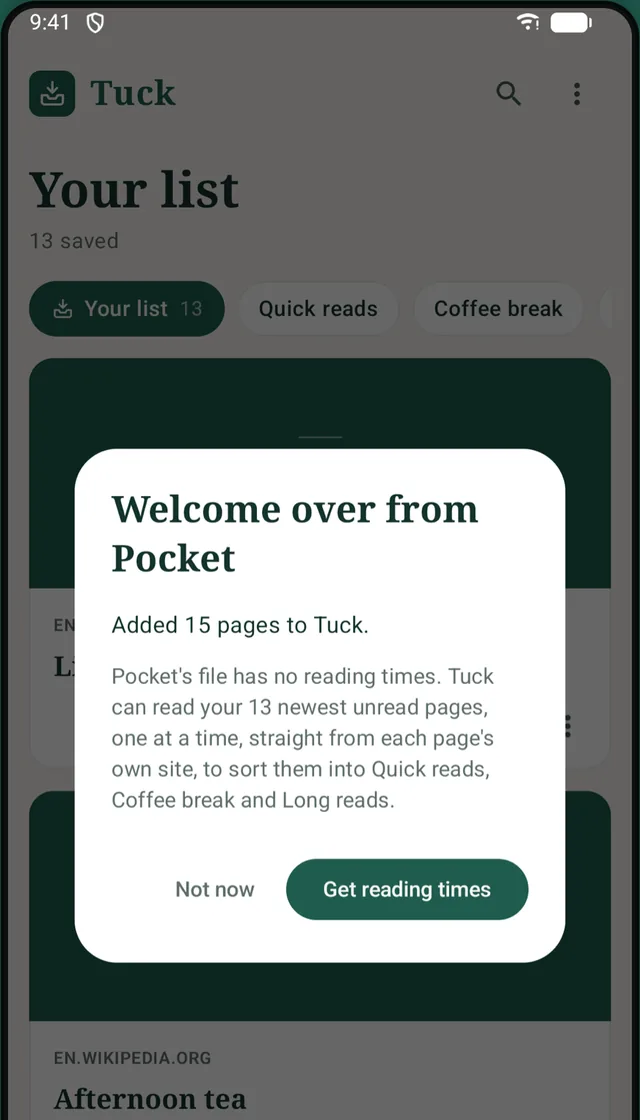
Moving from Pocket?
Bring your whole list across.
If you kept the export file Pocket gave you, Steep imports it: titles, tags, original save dates and your archive. The 2025 zip, a CSV from inside it, or the older HTML file all work.
Pocket’s file has no reading times, so Steep can fill them in for your newest unread pages, gently and one at a time, straight from each page’s own site. Nothing happens until you tap “Get reading times”, and you can stop at any time.
No export file? Start fresh: Share → Steep works from the first link you save.
Private by design
Your reading list is nobody else’s business.
Steep has no account, no server and no way to see what you save.
- Stays on your phoneYour list lives in Steep’s private storage and is kept out of automatic cloud backups.
- No ads, no trackingNo advertising, analytics or crash-reporting code. Nothing about how you use Steep is collected.
- Online only when neededTo get a page’s title, length and picture, Steep reads it once from that page’s own site. Turn that off and Steep never goes online.
- Yours to take with youExport your list to a file you choose and restore it on a new phone. It’s your list, not ours.
The little things
Quiet, and pleasant to use.
- TagsYour own tags, suggested as you save, each with its own shelf.
- SearchAcross titles, sites, summaries and tags.
- SortNewest first, oldest first, by title or by site.
- ArchiveFor finished reads, with Undo when you change your mind.
- Light and darkA warm, bookish design with serif titles that follows your phone’s dark mode.
- One permissionInternet, used only to read the pages you save.
Try it yourself
How much time do you have?
Every page you save lands on a shelf by its length. Pick the time you have, and Steep shows what fits.
8 reads · about 1 h 44 min of reading
-
Haiku
-
Tea ceremony
-
Lighthouse
-
Sourdough
-
Fountain pen
-
Origami
-
Bonsai
-
Afternoon tea
Examples. Steep works out each page’s reading time from the length of its main text, at about 230 words a minute.
Questions
Good to know.
When can I get Steep?
Steep is coming soon to Google Play. If you’d like to try it before then, email us and we’ll invite you to the test.
Does my list sync between devices?
No. Your list stays on the phone you saved it on. To move to a new phone, export your list to a file and restore it there.
Can I read articles inside Steep, or offline?
Not yet. Steep opens each page in your browser. Saving works from any app, any time.
Which phones does it work on?
Android phones running Android 8.0 or newer.
Is Steep the same app as Tuck?
Yes. Steep is the new name for Tuck. The rename is still under way, so you may see the old name in a few places for a while.
Is Steep connected to Pocket?
No. Steep is made by an independent developer and isn’t affiliated with Pocket or Mozilla. It can import the export file Pocket gave you.
A calmer place for things you mean to read.
Steep is coming soon to Google Play. Want to try it first? We’d love to hear from you.
Email us to try Steep early